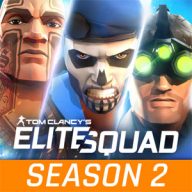
Tom Clancy's Elite Squad for Android
What is Tom Clancy's Elite Squad?
Looking for a tactical squad game on your phone? This page offers the Tom Clancy’s Elite Squad APK download for Android, version 2.3.0, together with its data file. Developed by Ubisoft and released in July 2020, it followed Tom Clancy’s ShadowBreak as another mobile entry in the Tom Clancy universe.
The Story and Gameplay of Tom Clancy’s Elite Squad
The game opens with mass protests spreading across many countries and quickly turning into shocking violence. The United Nations soon realizes these riots are linked, and a well-organized group finally steps out of the shadows: a professional army equipped with modern military hardware, not a simple street movement.
You take command of a special forces unit sent in to handle the crisis. Your job is to recruit elite operatives and build a team that can survive unpredictable battles. The game blends role-playing with tactics and strategy, letting you assemble a 5-member squad, and an opening tutorial walks you through the basics.
Compared with ShadowBreak, the visuals are improved with more detail, but the real hook is the roster of famous Ubisoft characters gathered in one game.
Characters and Game Modes
Heroes and villains come from Rainbow Six, Ghost Recon, The Division, Splinter Cell, H.A.W.X and EndWar. Familiar names include Sam Fisher, Nomad, Caveira, Megan, El Sueño and Walker.
Online PvP is the core of the experience, putting your squad against another real player. Throughout matches you use a range of items, weapons and characters, and each one can be upgraded separately so your team grows stronger over time.
Requirements and How to Install the APK and Data
You need Android 5.0 or higher and a constant internet connection; the game is rated 16+. The download consists of a 72 MB APK and a 111 MB zipped data file, plus roughly 400 MB of extra content downloaded inside the game on first launch.
- Install the APK file.
- Extract the data file and copy the com.ubisoft.tces folder to Android/obb in internal storage.
- Launch the game and let it download the additional data.
The game originally launched through pre-registration in a test phase, so it may not run properly on some devices.
Tom Clancy's Elite Squad features
- Heroes from Rainbow Six, Ghost Recon, Splinter Cell and The Division in one game
- Build a tactical 5-member squad
- Real-time online PvP battles
- Separate upgrades for weapons, items and characters
- Story about a secret organization threatening the world
- Improved graphics with richer visual detail
Tom Clancy's Elite Squad specifications
| Version | 2.3.0 |
|---|---|
| Size | 72 MB |
| File format | APK |
| Android | 5.0+ |
| Internet | Needs an internet connection |
| Genre | Action |
| Developer | Ubisoft |
| Updated | 2021-05-20 |
| Price | Free |
Download links
Download the APK file tom-clancys-elite-squad-v2.3.0-gnvid.com.apk 72 MB Extra ZIP file tom-clancys-elite-squad-v2.3.0-2-gnvid.com.zip 111 MBDirect links served by the GNVID download server.
How to install Tom Clancy's Elite Squad
- Download the APK file with the button.
- Allow "Install unknown apps" in Settings.
- Open the file and tap "Install".
Tom Clancy's Elite Squad FAQ
Can Tom Clancy's Elite Squad be played offline?
No, the game requires a constant internet connection because its core mode is online PvP.
Where do I put the data file?
Extract it and copy the com.ubisoft.tces folder to the Android/obb folder in internal storage.
What Android version is required?
Android 5.0 or higher.
How big is the full download?
The APK is 72 MB and the data file is 111 MB, with about 400 MB more downloaded in-game on first launch.
Related games
 Mr Gun
v2.0.12
Download · 163 MB
 Antarctica 88
v1.8.8
Download · 219 MB
 Hard Time (Prison Sim)
v1.530
Download · 129 MB
 METEL HORROR ESCAPE
v1.09
Download · 241 MB
 Dragon Hills 2
v1.2.22
Download · 112 MB
 A Way To Smash: Smart Fight
v2.16
Download · 102 MB
 Stick Demon Shadow Fight
v4.7
Download · 295 MB
 Last Pirate: Island Survival
v1.14.0
Download · 271 MB
