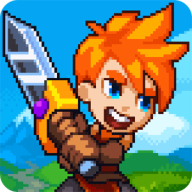
Dash Quest Heroes for Android
What is Dash Quest Heroes?
GNVID brings you Dash Quest Heroes, the action game for Android, in its latest version 1.5.71 as a free APK download from fast servers.
By installing Dash Quest Heroes on your Android tablet or phone, you’ll discover a captivating action game with stunning graphics, in the style of a four-part adventure. Become a legendary hero and embark on an adventure in a vast world! The story of Dash Quest Heroes tells of the world of Solas, which has fallen under the control of an evil creature named Zaru. Legendary heroes, including yourself, have united to save the world from this scourge! Your mission will be challenging. During your journey, you’ll explore rolling hills, burial caves, dense forests, and many other unique environments where only the strongest will survive! You’ll also have access to special weapons and equipment, and you can craft all sorts of items using the materials you collect! If you’re looking for a fun and entertaining game to fill your free time, Dash Quest Heroes is sure to please!
To date, Dash Quest Heroes has been downloaded hundreds of thousands of times by Android users worldwide on Google Play and has received a rating of 4.0 out of 5.0!
Dash Quest Heroes specifications
| Version | 1.5.71 |
|---|---|
| Size | 90 MB |
| File format | APK |
| Android | 7.0+ |
| Internet | Plays offline |
| Genre | Action |
| Updated | 2023-10-17 |
| Price | Free |
Download links
Download the APK file dash-quest-heroes-v1.5.71-gnvid.com.apk 90 MBDirect links served by the GNVID download server.
How to install Dash Quest Heroes
- Download the APK file with the button.
- Allow "Install unknown apps" in Settings.
- Open the file and tap "Install".
Dash Quest Heroes FAQ
Is Dash Quest Heroes free?
Yes, you can download Dash Quest Heroes for free as APK.
Does Dash Quest Heroes work offline?
Yes, it plays without an internet connection.
Which Android version does Dash Quest Heroes need?
Android 7.0 or newer.
How do I install the APK file?
Download the APK file with the download button, then open it from your file manager. Allow installs from unknown sources if your phone asks.
Related games
 Squad Alpha – Action Shooting
v1.7.43
Download · 613 MB
 Zombie Squad
v1.32.2
Download · 90 MB
 Creative Destruction
v2.0.5761
Download · 2929 MB
 Jungle Adventures 2
v458.0
Download · 71 MB
 Mystery Hotel
v1.5.003
Download · 224 MB
 Super Cats
v1.0.174
Download · 1080 MB
New
 BombSquad
v1.8.7
Download · 238 MB
 Warplanes: WW2 Dogfight
v2.5.2
Download · 194 MB
